
10.31.26 · 10 min read
Set up cold email infrastructure that meets Gmail, Yahoo and Outlook rules: domains, SPF, DKIM, DMARC, warm-up, tools and costs. Use the pre-launch checklist.
Cold email infrastructure is the setup that decides whether outbound mail reaches the inbox: sending domains, mailboxes, DNS authentication, tools and monitoring. This guide covers the rules Gmail, Yahoo and Outlook enforce, how many domains you need, how to set up SPF, DKIM and DMARC, what the tools cost and what the law requires.
Disclosure: QC Growth builds outbound systems for clients, including sending infrastructure. Provider rules come from Google, Yahoo and Microsoft, and volume norms come from vendor guides, labeled as such. Sources were checked on 30 October 2026.
The table gives the short version. The sections below explain each row and show where the claims come from.
| Topic | Short answer |
|---|---|
| Core parts | Secondary domains, mailboxes, SPF, DKIM, DMARC, sequencer, verification, monitoring |
| Provider rules | Authentication, alignment, spam rate below 0.3%, one-click unsubscribe for bulk |
| Mailboxes | Two or three per domain (vendor guidance) |
| Daily volume | About 30 to 50 cold sends per mailbox (vendor guidance) |
| Warm-up | Two to four weeks |
| Cost | About $130 to $200 a month at list prices, before domains |
| Law | CAN-SPAM in the US, PECR and GDPR in the UK and EU |
Most published figures on this topic come from vendors and agencies, so we label them as such.
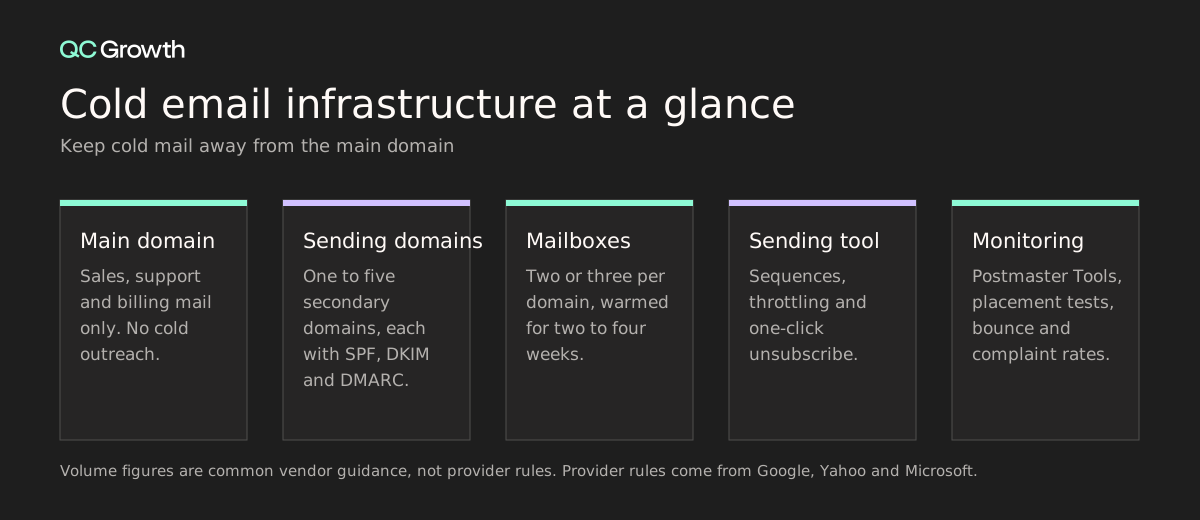
Cold email infrastructure is the technical setup behind outbound email: the sending domains, the mailboxes on them, the DNS records that prove the mail is yours, the tool that sends sequences, list verification and the monitoring that tells you when something breaks.
It decides whether a message reaches the inbox before anyone reads the copy. Mailbox providers check authentication, sending patterns and complaint rates on every message. A weak setup lands in spam whatever the copy says.
Volume makes it worse. Spray-and-pray outbound burns a small market and the domain’s reputation at the same time, which is why we favor precision over volume: fewer messages, sent to accounts with a live signal, from infrastructure that stays healthy.
Three providers set the rules most B2B senders must meet. Google's sender guidelines apply to everyone and add stricter rules at 5,000 or more messages a day to Gmail accounts. Yahoo's sender best practices follow the same pattern. Microsoft added requirements for senders of 5,000 or more messages to Outlook.com consumer addresses, and its Microsoft's support page says non-compliant mail is rejected with error 550 5.7.515.
Most early-stage cold programs sit below 5,000 a day. Meet the bulk rules anyway, because the cost is a few DNS records and the risk of missing them is your whole domain.
| Requirement | Yahoo | Microsoft (5,000+ a day) | |
|---|---|---|---|
| SPF and DKIM | SPF or DKIM for all; both for 5,000+ a day | SPF or DKIM for all; both for bulk | Both must pass |
| DMARC | Required for 5,000+ a day; p=none is allowed | At least p=none for bulk | Required; p=none, quarantine or reject |
| Alignment | From domain aligned with SPF or DKIM | DMARC must pass | SPF or DKIM aligned with the From domain |
| Spam rate | Below 0.3%; aim below 0.1% | Below 0.3% | Not stated on the support page |
| Unsubscribe | One-click for marketing mail at 5,000+ a day | One-click; honor within 2 days | Not stated on the support page |
| Other | Valid forward and reverse DNS, TLS | Valid forward and reverse DNS | Non-compliant mail rejected (550 5.7.515) |
Send cold email from separate secondary domains, not your main company domain, so a reputation problem cannot reach your sales and support mail. This is common practitioner guidance rather than a provider rule. Microsoft has reportedly said that subdomain volume rolls up to the main domain, so a separate domain gives cleaner separation than a subdomain.
On volume, vendor guides commonly suggest two or three mailboxes per domain and about 30 to 50 cold sends per mailbox a day. Google's own hard limits are higher, at 2,000 messages per user a day, 3,000 external recipients a day and 500 a day for trial accounts (Google Workspace sending limits). Stay far below the hard limits for cold mail.
| Team stage | Example setup | Daily capacity at 30 to 50 per mailbox |
|---|---|---|
| Founder testing a message | 1 secondary domain, 2 mailboxes | 60 to 100 sends |
| First outbound program | 3 domains, 2 mailboxes each | 180 to 300 sends |
| Scaling team | 5 domains, 3 mailboxes each | 450 to 750 sends |
Each sending domain needs its own records. The records on your main domain do not cover a secondary domain.
SPF lists the servers allowed to send for the domain. RFC 7208 limits SPF to 10 DNS-lookup terms (include, a, mx, ptr, exists and redirect); going over produces a permanent error, so avoid stacking includes. DKIM signs each message; Google requires keys of at least 1024 bits and recommends 2048. DMARC tells receivers what to do when checks fail and where to send reports. The updated DMARC specification is published as RFC 9989.
example-sending-domain.com.  TXT  "v=spf1 include:_spf.google.com ~all"
google._domainkey.example-sending-domain.com.  TXT  "v=DKIM1; k=rsa; p=YOUR_PUBLIC_KEY"
_dmarc.example-sending-domain.com.  TXT  "v=DMARC1; p=none; rua=mailto:dmarc@example.com"
Start DMARC at p=none with an rua address so you receive aggregate reports. Move to quarantine and then reject once every legitimate sender passes. Send a test to a Gmail address and check the headers for SPF, DKIM and DMARC passes before any campaign starts.
New mailboxes need a ramp. Vendor guides suggest two to four weeks of warm-up, and Instantly cites three to four. Increase volume gradually and keep reply-generating conversations in the mix.
Watch the complaint rate above everything else. Google and Yahoo both set a ceiling of 0.3%, and Google advises staying below 0.1%. A cold campaign with a weak list can cross that line in a day.
Authentication proves who you are. It does nothing about bad addresses. Verify every list before it reaches a sequence, because hard bounces hurt sender reputation fast.
Verification tools charge per address. ZeroBounce offers 100 free credits a month and pay-as-you-go from $39 for 2,000 checks. Our comparison of lead enrichment tools covers tools that verify emails while they enrich.
Google Postmaster Tools shows compliance status, spam rate, authentication, encryption and delivery errors for domains that send enough Gmail traffic. Vendor reports say the Domain and IP Reputation dashboards were removed when version 2 replaced version 1 in September 2025, so check what your account shows. Microsoft's SNDS reports by IP address, which helps only if you send from your own IPs.
Inbox placement varies by provider. Validity's 2026 Benchmark Report puts 2025 global inbox placement at 87.2%, Gmail at 89.8% and Microsoft at 77.4%. That data comes mostly from marketing email, so treat it as a ceiling for cold mail and run your own placement tests.
A small setup needs four kinds of tools: mailboxes, a sequencer, verification and placement testing. List prices change often, so check each page before you buy.
| Category | Example | Entry price (list, 30 Oct 2026) |
|---|---|---|
| Sequencer | Instantly Growth | $47 a month, or $37.60 billed annually |
| Sequencer | Smartlead Base | $39 a month, or $32 billed annually |
| Verification | ZeroBounce | 100 free credits a month; $39 for 2,000 checks |
| Inbox placement testing | GlockApps | Free for 2 tests; Essential $59 a month |
| Mailboxes | Google Workspace or Microsoft 365 | Per user per month; confirm on the provider's pricing page |
A first program with six mailboxes, one sequencer and a verification pack costs roughly $130 to $200 a month at these list prices, before domains and mailbox seats are confirmed. Our list of cold email agencies covers firms that run the whole setup for you.
In the US, the FTC CAN-SPAM guide sets the rules for commercial email, and it makes no exception for business-to-business mail. Use accurate headers and honest subject lines, identify the message as an ad, include a physical postal address, offer a clear opt-out and honor it within 10 business days. Penalties reach up to $53,088 per violating email.
In the UK, the ICO guidance on electronic mail marketing allows marketing email to corporate bodies such as limited companies, while sole traders and some partnerships count as individuals and need consent or the soft opt-in. Emailing a named employee still involves personal data, so document your legitimate interest and ask counsel before you scale in the UK or EU.
Run this list before the first send. Each item takes minutes, and skipping one can cost a domain.
| Check | Done when |
|---|---|
| Secondary domains bought and aged | Separate from the main domain, each with a working website or redirect |
| SPF, DKIM and DMARC published | Test message shows passes for all three |
| Mailboxes warmed | Two to four weeks of gradual volume |
| List verified | Invalid and risky addresses removed |
| Unsubscribe working | Link in the body and opt-outs honored quickly |
| Monitoring in place | Postmaster Tools access and a placement test run |
| Compliance reviewed | Postal address, honest subject lines, UK and EU rules checked |
Use the table as a quick reference.
It also works as a checklist for your next planning session.
| Category | Key Considerations |
|---|---|
| Domains | Secondary domains only, with their own SPF, DKIM and DMARC |
| Volume | Grow by adding domains and mailboxes, not by pushing each one harder |
| Health | Complaint rate below 0.1%, bounces near zero, placement tests before launch |
| Tools | Mailboxes, sequencer, verification, placement testing |
| Compliance | Postal address, honest subject lines, fast opt-outs, UK and EU checks |
| Mistakes to avoid | Main-domain sending, stacked SPF includes, skipping verification, no monitoring |
QC Growth is the embedded GTM team for Seed to Series A technical founders. A fractional pod of a top-1% GTM operator, a GTM lead, a GTM engineer and BDR support builds and runs your Allbound motion, with inbound, outbound and partner channels in one signal-driven system. The infrastructure, data and playbooks stay with you.
The operators have carried the bag in these markets: Luke Bivens at Gatsby and Netlify, Aron Schuhmann at Gatsby and OctoAI, Shane O’Connor through a 10x ARR run at Scalar, and Kori Bivens, a former VP at RVO Health who leads the healthcare division. Eraser.io CEO Shin Kim says the team “built a repeatable outbound process that helped us land our first enterprise customers.”
It is built for Seed to Series A companies past product-market fit in developer tools, AI, healthcare and deep tech, that want outbound running on infrastructure they own.
A pod sets up the domains, authentication, warm-up and monitoring with you, then runs the first campaigns on it. Packages run $7,500 to $25,000 a month on 6 to 12 month terms with no equity, against $57,000 to $81,000 a month plus 1.25% to 2.75% equity for a senior in-house team, broken down in QC’s in-house versus fractional cost math. See what the GTM Systems + Ops package includes.
Cold email infrastructure is the setup behind outbound email: secondary sending domains, mailboxes, SPF, DKIM and DMARC records, a sequencing tool, list verification and deliverability monitoring. It decides whether a message reaches the inbox before anyone reads it. Gmail, Yahoo and Outlook check authentication and complaint rates on every message.
Most early-stage cold programs need one to three secondary domains with two or three mailboxes each, based on common vendor guidance. At about 30 to 50 cold sends per mailbox a day, three domains with two mailboxes each supports 180 to 300 sends a day. Add domains as volume grows instead of pushing more mail through each mailbox.
You need DMARC for cold email if you send 5,000 or more messages a day to Gmail or Outlook, and it is good practice below that. Google and Microsoft accept a policy of p=none, which still sends you aggregate reports. Start at p=none and move to quarantine and reject once all legitimate senders pass.
Cold email infrastructure costs roughly $130 to $200 a month for a small program at list prices, before domains. Instantly Growth is $47 a month, Smartlead Base $39, ZeroBounce $39 for 2,000 checks and GlockApps Essential $59 a month. Mailbox seats from Google Workspace or Microsoft 365 add a per-user monthly fee.
You can send cold email from your main domain, but practitioners advise against it because complaints and blocks would also hit your sales, support and billing mail. Use separate secondary domains instead. Microsoft has reportedly said subdomain volume rolls up to the main domain, so a separate domain separates risk more cleanly than a subdomain.
Warming up a cold email domain takes about two to four weeks, according to common vendor guidance, and Instantly suggests three to four. Increase daily volume gradually and include conversations that get replies. Keep the spam complaint rate below 0.1%, as Google advises.
If you break Microsoft's sender rules at 5,000 or more messages a day to Outlook.com consumer addresses, Microsoft rejects the mail with error 550 5.7.515, according to its support page. Both SPF and DKIM must pass, a DMARC record must exist and SPF or DKIM must align with the From domain. Validity's 2026 report puts Microsoft inbox placement at 77.4%, the lowest of the major providers.
Cold email is legal for B2B in the US if it follows CAN-SPAM, which the FTC says makes no exception for business-to-business mail. That means honest headers and subject lines, a physical address and an opt-out honored within 10 business days, with penalties up to $53,088 per email. In the UK you may email corporate bodies, but sole traders need consent or the soft opt-in.
If you're at the inflection point, technology proven, market waiting, and the canyon between them, we should talk.