
10.31.26 · 27 min read
Compare the best lead enrichment tools for B2B in 2027, from Clay to Apollo and Lusha. See real pricing and fit by stage, then build your stack.
Lead enrichment tools fill the gaps in your CRM and lead lists: verified emails, phone numbers, job titles and company facts. This guide compares ten of them on published pricing, how credits work and fit for Seed to Series A teams, with notes on where each one falls short.
Disclosure: QC Growth publishes this comparison and builds enrichment workflows for clients, often in Clay, so we favor programmable tools. We do not sell any tool listed. Prices and features come from each vendor's own pages, checked on 30 October 2026, and many figures are the vendors' own claims. Verify before you buy.
The table lists ten tools in the order we would test them for an early-stage team. Prices are the ones each vendor publishes, checked on 30 October 2026.
| Company | Best For | Key Strengths | Pricing |
|---|---|---|---|
| Clay | GTM engineers building custom, multi-provider workflows | Waterfall enrichment, AI research agent, 200+ vendors under one contract | Free; Launch $167 a month annual, $185 monthly; Growth $446 or $495 |
| Apollo | Small teams wanting data and sequencing in one seat | Database, CRM and CSV enrichment, job-change alerts | Free; Basic from $49 per user a month annual (third-party) |
| FullEnrich | Teams that want a ready-made waterfall for emails and mobiles | 20+ vendors queried in order, charges on verified finds | 50 free credits; Pro from about $55 a month |
| Lusha | Reps and small teams starting on a low budget | Extension, API, CRM integrations, SOC 2 Type II stated | Free; Starter $49.90 monthly, $37.45 annual |
| Hunter | Email-only needs on a tight budget | Email finder and verifier, API, sequences | Free; Starter $49 a month, $34 yearly |
| LeadIQ | LinkedIn-first prospecting with Salesforce | Browser capture, job-change tracking | Free; Pro from $200 a month |
| People Data Labs | Engineers embedding data in their own pipeline | APIs and data licenses, ISO 27001 and SOC 2 Type 2 listed | Free 100 credits; Pro from $98 a month |
| Cognism | EMEA-focused teams with five or more sellers | Phone-verified mobiles, Bombora topics | Not published (quote) |
| ZoomInfo | Mid-market and enterprise teams | Breadth: contacts, technographics, intent | Not published (quote) |
| HubSpot Breeze Intelligence | Teams already on HubSpot | Enrichment inside the CRM | Credits tied to a paid HubSpot plan; rate sheet not public |

Three of the ten (Cognism, ZoomInfo and HubSpot Breeze Intelligence) do not publish a full price list, so they are not on the chart.
Lead enrichment tools add missing details to a lead record. You give the tool a name, an email address or a company domain, and it returns what it can find: a verified work email, a direct phone number, job title, company size, funding stage, tech stack. It can run on one record at a time, on a spreadsheet, or across a whole CRM.
The category overlaps with data enrichment tools and B2B data enrichment services, and buyers use the labels interchangeably. The products fall into four groups. Contact databases such as Apollo, Lusha and Cognism sell their own data. Waterfall services such as FullEnrich query many sources in sequence. Workflow builders such as Clay connect many providers and AI research steps. Data APIs such as People Data Labs return raw records for engineers to wire in.
Most teams end up with tools from at least two groups, for example a workflow builder on top of one or two data sources.
Contact data goes stale because people change jobs. The US Bureau of Labor Statistics reports median employee tenure of 4.1 years for wage and salary workers and 3.0 years for workers aged 25 to 34. In the same release, 20.6% of workers had one year or less of tenure (BLS Employee Tenure, January 2026 data). Tenure is only a proxy for data decay, yet it shows how fast a list of job titles ages.
Founders feel this first. An outbound list comes from a CSV export, many rows lack a verified email, and nobody can say which accounts match the ICP. Enrichment closes those gaps before the first email goes out. That protects sender reputation and gives each message something specific to say.
The payoff is better routing and better targeting. When every record carries a title, a company size and a verified contact, the CRM can assign leads by rule and a rep can decide in seconds whether to call.
Needs differ by stage and by what you sell. Five groups come to us most often.
Budget changes the answer more than job title does. A founder with nothing to spend starts on free plans, while a Series A team with a GTM engineer can afford a workflow builder plus one data source.
Founders who closed the first deals through their own network run out of warm contacts. They need verified emails and phones for accounts they have never met.
A low-cost database plus a workflow builder usually covers it. The goal is a list of 200 to 500 accounts a week, with a contact at each.
Dev-tool buyers hide behind personal email addresses and GitHub handles. A tool that maps a company to the right engineering lead matters more than raw contact volume.
Technical signals such as repository activity and release cadence add context that a standard database lacks. We cover that in the signals section below.
Enterprise deals involve a buying group of several people. Enrichment has to find the champion, the technical evaluator and the budget owner at each account.
Waterfall coverage and mobile numbers carry more weight here, because multi-threading needs several verified contacts per company.
Healthcare buyers are harder to reach and rules around outreach are stricter. Compliance statements and data handling terms need a closer read before you buy.
Check where each vendor hosts data and whether it publishes a data processing agreement, then ask counsel to review.
Teams at this stage already have a CRM full of old records. The job is to clean it, keep it clean and route inbound leads in real time.
Event-driven re-enrichment, such as job-change alerts, matters more than a one-time list buy.
Each review follows the same format and uses the vendor's own published figures where they exist. We mark anything we could not verify. QC Growth is not listed as a tool because it is not one; see the last section for how we build these stacks.
Clay is a workspace for building enrichment workflows. You set up tables, pick from its data providers (it says one contract gives access to more than 200 data and AI vendors), and chain steps such as waterfall lookups and an AI research agent called Claygent.
It sits in the middle of many outbound stacks. Clay can read from and write to a CRM, and you can bring your own API keys for providers you already pay for.
The strength is flexibility. A workflow can look up a funding event, check a company's hiring page, pull a contact from one provider, fall back to a second, and score the result, all in one table.
Several other tools in this list, including Lusha, LeadIQ and FullEnrich, list Clay as an integration, so they can act as inputs to Clay.
Clay's free plan includes 500 actions and 100 data credits a month, with 200 rows per table and no phone enrichment. Launch costs $167 a month billed annually or $185 monthly. Growth costs $446 a month billed annually or $495 monthly, and Enterprise is custom. Data credits start at $0.05 each. Source: Clay pricing, checked 30 October 2026.
Running your own API key still uses one action per run. Model the number of rows times the number of steps before you pick a tier.
Clay is one of the strongest choices for teams that want to build their own enrichment logic, and it is our default starting point when a client has an engineer or a GTM engineer to run it.
It is a poor fit for a founder who wants a contact list by Friday. A seat-based database such as Apollo or Lusha gets there faster.
Apollo combines a contact and company database with outreach tools and a Chrome extension. Its enrichment product updates CRM records instantly or on a schedule, and it accepts CSV uploads.
The company says its database holds about 240 million contacts and 30 million companies. That is a vendor figure and it is not independently audited.
Apollo bundles three jobs into one subscription: finding contacts, enriching records and sending sequences. For a team of one to five, that can replace several line items.
It also offers job-change alerts, duplicate detection and merging, and an open API.
Apollo offers Free, Basic, Professional and Custom plans. The pricing page we fetched showed no dollar amounts, so we rely on a third-party summary (noon.ai, dated 23 October 2026) for per-user prices billed annually: Basic $49, Professional $79 and Organization $119. Monthly billing is listed at $59, $99 and $149.
Credit allowances differ by source, so check the live pricing page. Source: Apollo pricing.
Apollo is one of the smartest options for budget-conscious teams that want one login for data and outreach. The all-in-one design saves setup time.
Teams that want waterfall logic across several sources will outgrow it and will usually pair it with a workflow builder.
FullEnrich is a waterfall service. It queries many data vendors in sequence to find a work email and a mobile number. Its homepage cites more than 20 vendors and its pricing page says more than 25.
It also offers email verification, phone line checks, prospect search and reverse email lookup.
The billing logic is easy to reason about: credits are charged only when verified data is found, according to the vendor.
It connects to HubSpot, CSV files, an API, an MCP server and automation tools such as Zapier, Make, n8n and Clay.
The Pro plan appeared as about $55 a month for 1,000 credits, with a slider up to more than 100,000. The pricing text was hard to read when we checked, so confirm the figure on the page. A work email costs 1 credit, a personal email 3 and a mobile 10. Credits roll over for 3 months on monthly plans and 12 months on yearly plans. Source: FullEnrich pricing.
Enterprise pricing is custom.
FullEnrich is one of the strongest choices when the goal is a verified mobile and email for a list of known people, and you do not want to stitch five vendors together yourself.
It does not find the accounts for you. Pair it with a source of target companies.
Lusha sells contact and company data through a Chrome extension, an API, an MCP connector and CRM integrations. It enriches existing records, inbound leads and CRM data, and adds buying signals and lookalike search.
Its integrations list includes Salesforce, HubSpot, Zoho, monday, Pipedrive, Bullhorn, Dynamics and Capsule, plus Clay, Make, n8n and Zapier.
Lusha is simple to start with. The free plan includes 40 credits a month, and paid plans start below $50 a month.
Its Trust Center states SOC 2 Type II and several ISO certifications. Older pages list different ISO standards, so check the current list before sending it to a security reviewer.
Free is $0 with 40 credits a month. Starter is $49.90 monthly or $37.45 a month billed annually, with 400 credits. Professional is $69.90 or $52.45 with 600 credits. Premium is $399.90 or $299.95 with 3,400 credits, and Scale is custom. A verified email uses 1 credit. Source: Lusha pricing.
Credits are small against team volume, so estimate your monthly lookups first.
Lusha is one of the smartest low-cost entry points for a founder or a first SDR, and it plays well with Clay and automation tools.
Teams that need hundreds of phone numbers a month will find the credit math tight.
Hunter finds and verifies business email addresses and can run outreach sequences from your own inbox. Its tools include Domain Search, Email Finder, Email Verifier, company enrichment, a Discover feature, a Chrome extension, a Google Sheets add-on and an API.
It syncs with HubSpot, Zoho, Salesforce and Pipedrive, and connects to Zapier.
Hunter does one thing at a low price. Its free plan includes 50 credits a month, and paid plans start at $49 a month.
Its security page says data is hosted in Belgium on Google Cloud and links a data processing agreement.
Free is $0 with 50 credits. Starter is $49 a month, or $34 billed yearly, with 2,000 credits. Growth is $149 or $104 with 10,000 credits. Scale is $299 or $209 with 25,000 credits, and Enterprise is custom. One credit finds one email. Source: Hunter pricing.
A separate API-only data purchase exists for bulk lookups.
Hunter is a sensible choice when email is the only field you need and budget is tight.
If you need mobile numbers, firmographics or waterfall logic, pair it with another tool or pick a broader one.
LeadIQ captures contacts from the browser, enriches them and syncs them to a CRM or sales engagement tool. It also tracks job changes among past contacts and champions.
It offers email and mobile data, with integrations that include Salesforce, HubSpot (through Workato), Salesloft, Outreach, Gong, Clay and Zapier.
LeadIQ is built around the rep's day: capture in the browser, enrich, push to the CRM, get alerted when a champion moves.
Its homepage states SOC 2 Type II and describes the product as GDPR-ready.
Free is $0 for one user and 50 credits. Pro starts at $200 a month for 200 credits and up to 5 users, with higher tiers from 500 to 6,750 credits. Annual billing is 25% off, though annual prices were not shown. Enterprise is custom. An email costs 1 credit, a phone 10, both 11 and account enrichment 3. Source: LeadIQ pricing.
Any plan can be tried free for 30 days, per the pricing page.
LeadIQ is one of the strongest options for reps who prospect inside LinkedIn and Salesforce.
Teams that want bulk list enrichment should look elsewhere or move to Enterprise.
People Data Labs sells person, company and job-posting data through APIs and licensed data feeds. The APIs enrich, search, autocomplete and clean records, and data licenses ship through AWS, GCP, Snowflake and Databricks.
It targets engineers who embed data into a product or build their own enrichment pipeline.
PDL returns records through an API and has no prospecting screen. That suits teams who already write code and want control over matching and storage.
Its homepage lists ISO 27001 and SOC 2 Type 2. We did not confirm GDPR or CCPA statements on the pages we reviewed.
The free plan includes up to 100 credits a month with contact data obfuscated. Pro starts at $98 a month for 350 credits, with a 20% saving on annual commitments. Enterprise is custom, annual and priced by volume. Billing is per record retrieved. Source: People Data Labs pricing.
The overage rate is not published.
People Data Labs is one of the smartest choices for teams with engineers who want enrichment inside their own code.
A non-technical founder will find it more work than a database with a browser extension.
Cognism is a sales intelligence product with a European focus. It sells phone-verified mobile numbers, CRM enrichment that flags missing or outdated fields, and automatic enrichment of inbound leads.
It syncs with Salesforce, HubSpot and Pipedrive, offers MCP and API access, and includes Bombora intent topics.
Cognism describes itself as compliance-first, with a compliance page and a trust centre. A snippet from that page mentions GDPR and CCPA practices and ISO 27001 and 27701 certification, though we did not open the page itself.
Admins can select up to 12 Bombora topics from the intent catalog.
Cognism does not publish prices. It sells Standard and Pro prospecting tiers with 5 seats each, plus CRM Enrichment on its own or as an add-on. Credits are used per revealed contact. There is no free trial, only a free data sample. Source: Cognism pricing.
Expect a quote and a sales conversation.
Cognism is one of the strongest choices for EMEA-heavy outbound with a team of five or more reps.
A solo founder or a two-person team will pay for seats they do not need.
ZoomInfo is an enterprise B2B data company. Enrichment comes as CRM Enrichment, an API and data delivery, and it is not sold as a standalone line item.
Fields include emails, direct dials, mobiles, titles, departments, seniority, company hierarchy, technographics and intent. The page states waterfall querying in supported workflows.
Breadth is the draw. One contract covers contact data, company data, technographics and intent.
Enrichment can run on demand, when a record is created, or on a schedule.
ZoomInfo does not publish prices. Sales plans are called Professional, Copilot Advanced and Copilot Enterprise, and marketing plans are Marketing Demand, ABM Lite and ABM Enterprise. Billing mixes licenses with credits, with one credit per profile export. Source: ZoomInfo pricing.
Marketing plans cite 75,000 to 150,000 monthly credits.
ZoomInfo is one of the strongest choices for larger teams that need a single, broad data contract.
Seed to Series A teams rarely need that breadth, and the contract terms are heavy for them.
Breeze Intelligence is HubSpot's enrichment product. HubSpot acquired Clearbit in late 2023, and Clearbit's data now sits inside HubSpot's credit system.
Per HubSpot Community posts and Clearbit's help pages (seen through search results, as the pages themselves blocked our fetch), new standalone Clearbit subscriptions are no longer offered and new users are pointed to Breeze Intelligence. Confirm the current status with HubSpot.
The draw is proximity. Enrichment happens inside the CRM where the records live.
Credits are shared across HubSpot features, which can simplify billing for existing customers.
HubSpot's knowledge base says credits are used per action, with overage at $0.010 per credit in blocks of 10, billed monthly, and that credits are tied to a paid HubSpot subscription and paid seats. The per-feature costs sit in a rate sheet we could not access. Source: HubSpot credits and billing.
Several blogs quote entry prices for Clearbit-era plans. They conflict with each other, so we leave them out.
Breeze Intelligence is one of the smartest picks for teams already committed to HubSpot who want enrichment close to the CRM.
Teams on another CRM, or teams that want to compare providers record by record, have better options.
Waterfall enrichment means asking several data sources for the same field, one after another, and stopping at the first verified answer. Source A may know a contact's email and source B may know the mobile number. Chaining them raises coverage compared with using one source alone.
The order matters for cost. Put the cheapest source with the best coverage in your market first, and keep the expensive one for last. Some tools charge only when data is found. FullEnrich says it does, and Clay lets you bring your own API keys so you pay each provider directly.
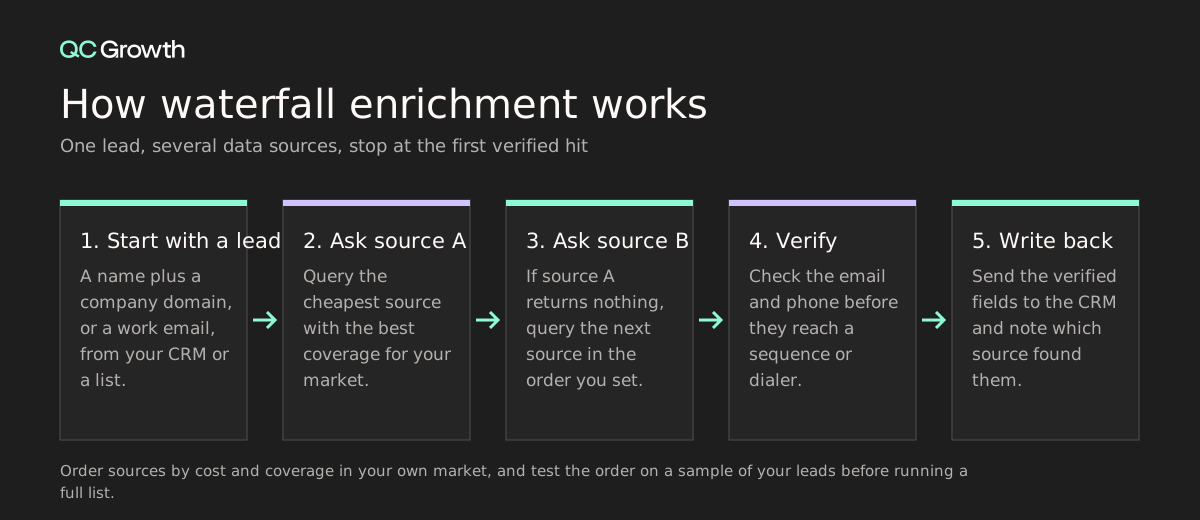
Waterfall logic has a cost. Each extra source adds a lookup, so a poor order can multiply spend without raising the hit rate. Track which source found each field. After a few hundred records you will see which sources earn their place.
Searches for Clay alternatives are common, and the reason is usually cost forecasting. Clay charges for actions and for data credits, so spend depends on rows times steps. Teams new to it often overspend in the first month.
Several tools here work as inputs to Clay, which is worth knowing before you switch. The table maps common needs to options from this list.
| If you want | Consider | Why |
|---|---|---|
| You want programmable workflows but dislike action-based pricing | FullEnrich for waterfall; People Data Labs plus Zapier, Make or n8n for a build-it-yourself pipeline | Pricing is credits per found record or per record retrieved |
| You want data and outreach in one seat | Apollo | One plan covers database, enrichment and sequencing |
| You want to keep Clay and cut spend on one input | Lusha, LeadIQ or FullEnrich as a data step | All three list Clay as an integration |
| You only need emails | Hunter | Entry plan at $49 a month with 2,000 credits |
| You sell mainly in Europe | Cognism | European focus and phone-verified mobiles |
Standard enrichment returns fields about a person or company: title, headcount, industry. For developer-tool and AI companies, the useful fields often sit elsewhere. GitHub exposes public repository data such as stars, forks and releases through its API. Funding databases show a new round. Job boards show whether a target hired an infrastructure engineer last month.
Those signals help you pick accounts and decide when to reach out. A company that shipped a major release and opened three infrastructure roles is a better target this week than one that did neither. QC Growth prospects on technical signals such as GitHub activity, funding events and release cycles, and we feed them into the same CRM that holds your enriched contacts.
Handle this data with care. Matching a GitHub profile to a work email raises legitimate-interest questions under GDPR. Write down your basis for processing, log where each field came from, and ask counsel before you scale. None of the ten tools above removes that responsibility.
Test before you buy, because ranking lists, including this one, only narrow the field. Use these six checks.
Plan the test before you ask for demos. The results often reorder any ranking, because coverage differs by market and by company size.
Run the same 200 leads through two or three tools and score each one on the share of verified emails, the share of mobile numbers, credits used and bounce rate after a send. Include a mix of US and EU contacts and startups and larger firms, because coverage differs by segment.
Free plans cover part of this test. Hunter, LeadIQ and FullEnrich each give 50 credits, Lusha 40 and People Data Labs 100 (with contact data hidden until Pro).
List price hides the real cost. Divide total spend by the number of records that came back verified. A tool with 1,000 credits for $55 can cost more per useful record than one with 400 credits for $49.90 if the hit rate is lower.
Count the credit cost of each field. A mobile number costs 5 credits at Lusha and 10 at LeadIQ and FullEnrich.
Each vendor covers some regions and company sizes better than others. Cognism focuses on Europe. Apollo, ZoomInfo and Lusha publish large database figures, but those are vendor claims.
Your 200-lead test settles it for your own list.
Check that the tool writes enriched fields back to your CRM, handles duplicates and can re-run on a schedule or on a trigger. Ask what happens to fields a rep edited by hand.
Integrations vary: LeadIQ reaches HubSpot through Workato, and Lusha lists direct HubSpot and Salesforce connections.
Ask for the data processing agreement, the hosting region and the security attestations the vendor holds. SOC 2 Type II, ISO 27001 and similar reports matter for enterprise buyers and for HealthTech.
Hunter's security page, for example, states hosting in Belgium but makes no SOC 2 or ISO claim. That is useful to know before procurement asks.
A workflow builder needs an owner. If nobody on the team can build and maintain tables, a seat-based database is the safer buy.
If you want the system built and handed over, that is the work we do at QC Growth.
Fill in one row per tool after the test, using the same 200 leads for each.
| Metric | How to measure it |
|---|---|
| Verified email rate | Verified emails divided by leads submitted |
| Mobile rate | Mobile numbers returned divided by leads submitted |
| Cost per enriched record | Total credits cost divided by verified records |
| Bounce rate | Hard bounces divided by emails sent from the enriched list |
Use the table as a checklist when you shortlist.
It also works as a brief for vendor calls. Ask each shortlisted vendor to fill in the rows that apply to your team.
| Category | Key Considerations |
|---|---|
| Top 3 lead enrichment tools | Clay for custom workflows, Apollo for data plus sequencing on a budget, FullEnrich for a ready-made waterfall |
| Who is it for | Founders, SDRs, GTM engineers and RevOps leads who need verified contacts and company facts |
| Use cases | List building, CRM cleanup, inbound lead routing, job-change alerts, signal-based outbound |
| How to choose | Test 200 of your own leads, compare cost per enriched record, check regional coverage, CRM write-back and compliance |
| Mistakes to avoid | Buying on list price, skipping a test, ignoring credit cost per field, and leaving the system without an owner |
| Pricing starts | $0 on free plans; $49 to $55 a month for entry paid plans at Hunter, Lusha and FullEnrich; $185 for Clay Launch on monthly billing |
QC Growth is the embedded GTM team for Seed to Series A technical founders. A fractional pod of a top-1% GTM operator, a GTM lead, a GTM engineer and BDR support builds and runs your Allbound motion, with inbound, outbound and partner channels in one signal-driven system. The infrastructure, data and playbooks stay with you.
The operators have carried the bag in these markets: Luke Bivens at Gatsby and Netlify, Aron Schuhmann at Gatsby and OctoAI, Shane O’Connor through a 10x ARR run at Scalar, and Kori Bivens, a former VP at RVO Health who leads the healthcare division. Eraser.io CEO Shin Kim says the team “built a repeatable outbound process that helped us land our first enterprise customers.”
It is built for Seed to Series A companies past product-market fit in developer tools, AI, healthcare and deep tech, that want enrichment, signals and outreach wired into one system they own.
A pod sets up enrichment and signal stacking in your CRM in the first weeks and runs outbound on top of it. Packages run $7,500 to $25,000 a month on 6 to 12 month terms with no equity, against $57,000 to $81,000 a month plus 1.25% to 2.75% equity for a senior in-house team, broken down in QC’s in-house versus fractional cost math. See what the GTM Systems + Ops package includes.
The best lead enrichment tool in 2027 for Seed to Series A teams that can build workflows is Clay, with a free plan and paid plans from $185 a month on monthly billing. Teams that want a seat-based database with sequencing usually start with Apollo, which also has a free plan. FullEnrich suits teams that want a ready-made waterfall for verified emails and mobiles. Test two of them on 200 of your own leads before you commit.
Consider cost per enriched record, regional coverage, CRM write-back, compliance documents and who will run the tool. Test two or three tools on the same 200 leads and score the verified email rate, the mobile rate and the bounce rate. Credit costs differ by field: a mobile number is 5 credits at Lusha and 10 at LeadIQ and FullEnrich.
QC Growth builds the enrichment, signal tracking, CRM and reporting layer for Seed to Series A teams, and it works inside the tools you already use. It sells services and holds no data of its own, so it picks tools from lists like this one to fit your stage and budget. Its GTM Systems + Ops package covers infrastructure only, and a Full Service package adds outbound.
Book time through the QC Growth contact page and bring your CRM, your ICP and your current outbound numbers. QC Growth reviews your current stack, then scopes either the GTM Systems + Ops package or the Full Service package. The infrastructure, data and playbooks stay with you.
Switching mostly means re-mapping CRM fields and re-running enrichment on existing records, so you spend credits again on any record you re-enrich. Several tools share integrations, which helps: Lusha, LeadIQ and FullEnrich all list Clay, so you can swap a data source inside a workflow without rebuilding it. Plan the move around your contract renewal date.
A lead enrichment tool is worth the cost for a seed-stage startup when outbound is a main channel and the team has no one to build lists by hand. Several tools let you test for free: Hunter, LeadIQ and FullEnrich give 50 credits, Lusha 40 and People Data Labs 100. Paid entry plans start at $49 a month at Hunter and $49.90 at Lusha.
Waterfall enrichment is a method that asks several data sources for the same field in sequence and stops at the first verified answer. It raises coverage because one source can find an email that another misses. FullEnrich sells it as a service, and Clay lets you build it with your own provider keys. Order sources by cost and test the order on a sample of your leads.
B2B data should be re-enriched when something changes, such as a job change. BLS data shows median tenure of 3.0 years for workers aged 25 to 34, so contact titles age as people move. Apollo and LeadIQ both offer job-change alerts that can trigger a refresh for the records that matter.